
Word2Vec models can be either a Continuous Bag of Words model, or a Skipgram model. The models differ in their methods though. CBOW models are quicker to train and they predict a target word based on all of the surrounding words. The context vectors from neighboring words are used to predict the target word. The window size parameter found in the model parameters below are considered to predict the target word
Skipgram predicts the word following the target word based on context. Here is a model using skipgram architecture. First, I set the cores to use all cpu cores to enable a quick process.

Here, setting sg=1, this is how I communicate that I am creating a skipgram model rather than a cbow model.

Some of the required and optional hyperparameters are included in the above model but there are several additional options to get each model to work the way you need it to. Here are the Word2Vec model parameters for gensim.models.word2vec.Word2Vec, directly from Gensim’s documentation:
- sentences (iterable of iterables, optional) – The sentences iterable can be simply a list of lists of tokens, but for larger corpora, consider an iterable that streams the sentences directly from disk/network.
- corpus_file (str, optional) – Path to a corpus file in
LineSentenceformat. You may use this argument instead of sentences to get performance boost.
Either use sentences or corpus file, both cannot be used. Should corpus_file be used, check out the information regarding LineSentence format, as it is very specific and no other formats are accepted.
- vector_size (int, optional) – Dimensionality of the word vectors.
Typical vector sizes are 50, 100, 200, and 300, of which GLoVe pretrained vectors utilize as well. When training your own model, this is not neccessary, and can be whatever works best for your model. Vectors over size 300 tend to lose a lot of information, so keep this in mind.
- window (int, optional) – Maximum distance between the current and predicted word within a sentence.
The window parameter assesses the surrounding words so context is provided in the vector when used. A good starting place is to assess the min() and max() length of the sentences to get a baseline for window length.
- min_count (int, optional) – Ignores all words with total frequency lower than this.
Words that occur infrequently, such as once or twice can negatively impact the final model, however, pretrained models can get contextual information from these words. Adding a min_count can speed up training of a model but can also hinder the information availability for contextual processing.
- workers (int, optional) – Use these many worker threads to train the model (=faster training with multicore machines).
- sg ({0, 1}, optional) – Training algorithm: 1 for skip-gram; otherwise CBOW.
The sg parameter is only required for skipgram based vectors, and if not set to sg=1, CBOW model is default, therefore if doing CBOW vectorization, this does not need to be set.
- hs ({0, 1}, optional) – If 1, hierarchical softmax will be used for model training. If 0, and negative is non-zero, negative sampling will be used.
- negative (int, optional) – If > 0, negative sampling will be used, the int for negative specifies how many “noise words” should be drawn (usually between 5-20). If set to 0, no negative sampling is used.
- ns_exponent (float, optional) – The exponent used to shape the negative sampling distribution. A value of 1.0 samples exactly in proportion to the frequencies, 0.0 samples all words equally, while a negative value samples low-frequency words more than high-frequency words.
The negative sampling options are not required but depending on the size and type of data, can be useful, especially when text is noisy.
- alpha (float, optional) – The initial learning rate.
- min_alpha (float, optional) – Learning rate will linearly drop to min_alpha as training progresses.
The documentation suggests that alpha is not set, but default processing be used, however, the option is available for models that are not learning as the user desires.
- seed (int, optional) – Seed for the random number generator.
Setting the seed enables reproducibility, per usual.
- max_vocab_size (int, optional) – Limits the RAM during vocabulary building; if there are more unique words than this, then prune the infrequent ones. Every 10 million word types need about 1GB of RAM. Set to None for no limit.
- max_final_vocab (int, optional) – Limits the vocab to a target vocab size by automatically picking a matching min_count. If the specified min_count is more than the calculated min_count, the specified min_count will be used. Set to None if not required.
- sample (float, optional) – The threshold for configuring which higher-frequency words are randomly downsampled, useful range is (0, 1e-5).
Words like ‘the’ or ‘a’ or even common words relating specifically to the data can provide little to no information due to oversaturating the dataset, in cases like this, setting the sample parameter can provide a more useful model state.
- epochs (int, optional) – Number of iterations (epochs) over the corpus. (Formerly: iter)
- compute_loss (bool, optional) – If True, computes and stores loss value
More information on compute_loss found below.
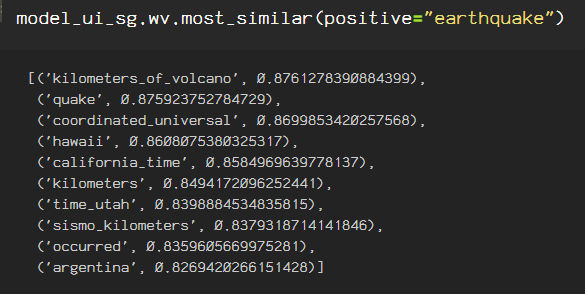
The skipgram algorithm predicts the following inputs with it’s closest vectors from the corpus that I used for training. Here are the .most_similar vectors predicted using the key, ‘earthquake’.
Here are the .most_similar word vectors predicted using the key ‘california’.

Parameters for the CBOW model can also be taken into consideration. It never hurts to try both models, however, the Skipgram model tends to work better for cases involving larger datasets, and CBOW lends itself best to smaller datasets, and the time it takes to process smaller datasets using the Skipgram model ends up being less effective when utilizing the vectors in modeling predictions.
Next, I create an uninitialized Word2Vec model using CBOW architecture, keeping the size of the vectors at 100, the ‘sg’ hyperparameter
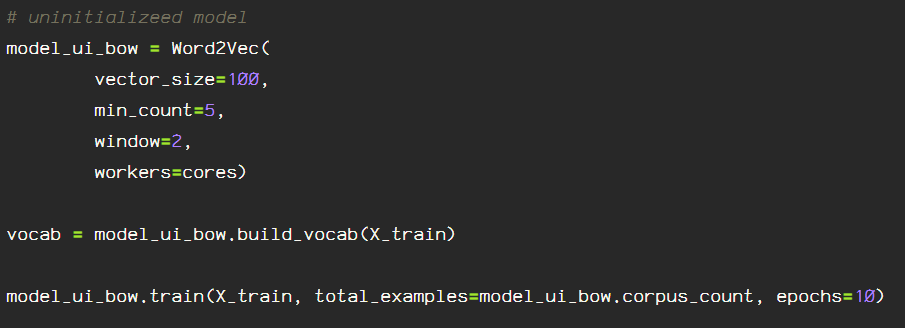
Now, looking at the most_similar vectors using the CBOW architecture:

Here are the most similar vectors using the key ‘earthquake’, they following words are closely related. Adjusting the size of the vector, the epochs, and the other parameters alter the vectors immensely.

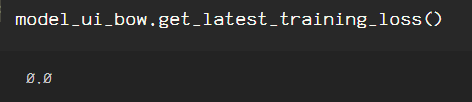
When training the models, I included the compute_loss=True line of code so as to check the loss incurred in the model. To obtain the loss information for each model, just call the model’s ‘.get_latest_training_loss()’ for the models and comparing.
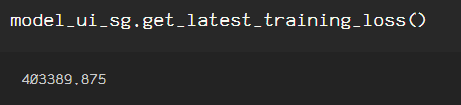
The loss indicated is from fitting the data to the models, it is not indicative of any loss that will incur in your model further down the pipeline. Therefore, for my binary classification model which this dataset is for, I will use the skipgram model, due to the fact that I want to obtain contextual information contained in the surrounding words for each tweet in my dataset.
There are additional options such as FastText, TF-IDF, or pretrained word embeddings using Glove to create word vectors.
 Data Insights