Creating and utilizing web scraping and connection simulation bot for L-i-n-k-e-d-I-n

Building on the previous installments on web scraping, this is a culmination of the previous work on this script.
First, the automated login function is as follows:
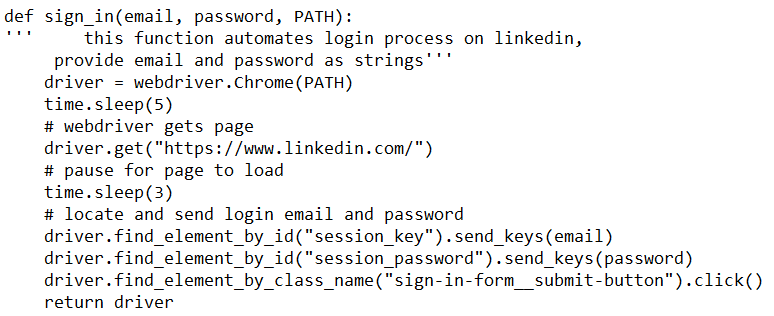
The PATH variable depends on the browser used. In this case, I used Chrome, therefore the code is as follows:

Enter the user’s email address and password, and a browser window will open, controlled by the Selenium WebDriver.

Next, the people_scrape function returns a dataframe with information obtained through the search bar, specifically for people/connection results

A function used within the previous function is used to paginate through the search results.

Next, create the function to get the job history information for each profile.

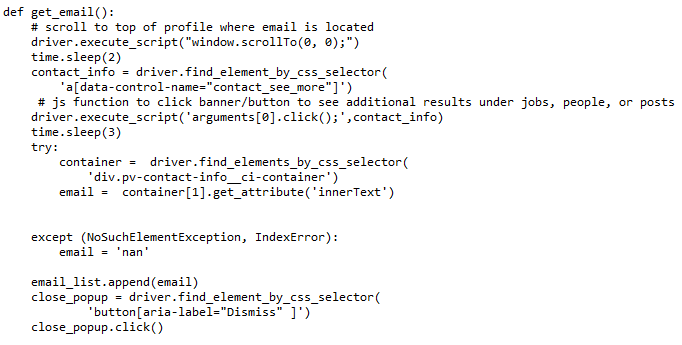
Then this function is to obtain the email address from the profile, if available:
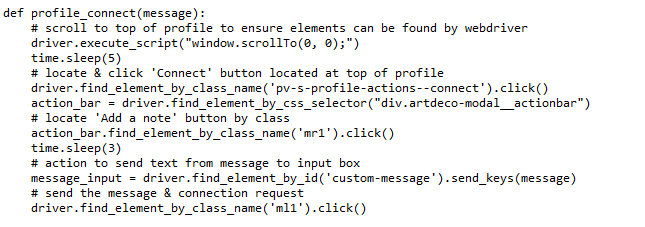
Then, with the information provided, a message can be composed and a connection initiated using a personal message.
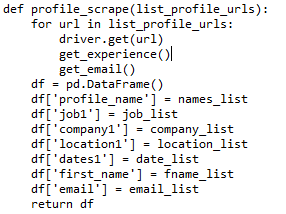
Then, combining these together as such returns a dataframe, saving a .csv file for reference:
Then, to complete the script, this culminates to a function that does all of the aforementioned tasks, by running it with the arguments representing the search term and the number of pages the initial scrape is to include for the minimized search results page. From there, the information is acquired, saved and transformed to initialize a connection on the site, and then the web driver is closed, finalizing the script.

 Data Insights